
Download USB Drive Antivirus – USB antivirus, USB security, USB drive protection, virus protection, malware protection, autorun virus removal, pen drive security, USB worm protection, mobile security, device protection
Overview
USB Drive Antivirus is a mobile security application developed by Easysoft, designed to safeguard Android devices from threats originating through USB-connected storage media. The app addresses a critical vulnerability in mobile ecosystems: the risk of malware infiltration via external drives such as pen drives, memory cards, and other removable storage devices. By focusing specifically on USB-based threats, the app fills a niche in the security landscape where general antivirus tools may overlook device-specific attack vectors. Its primary function is to detect, block, and remove malicious code—such as viruses, worms, and trojans—attempting to exploit USB connections. This is particularly relevant for users who frequently transfer files between computers and Android devices, or those who use shared or public USB ports. The app aims to protect both the device’s internal storage and connected external media from contamination. Target users include individuals, professionals, and organizations that prioritize data integrity and device safety when handling removable storage. The app’s focus on autorun viruses and persistent USB worms suggests a concern for sophisticated, stealthy threats that may compromise system functionality. Although the developer did not provide additional technical details about the underlying detection engine or scanning methodology, the app’s core purpose is clear: to offer dedicated protection against USB-specific malware. In the broader context of mobile security, USB Drive Antivirus represents a specialized tool that complements general antivirus solutions by targeting a high-risk, often overlooked attack surface.Key Features & Functionality
USB Drive Antivirus delivers a focused set of functionalities tailored to USB threat mitigation on Android devices. The app’s primary feature is automatic scanning upon USB device connection, which triggers real-time analysis of the inserted drive. This proactive mechanism helps prevent malicious payloads from executing before they can affect the system or spread to other devices. Another key function is autorun virus detection and removal. The app identifies and neutralizes malicious autorun.inf files—common tools used by malware to auto-execute when a drive is plugged in. This capability helps restore normal device functionality, especially when infected drives prevent access to storage via standard navigation. The app is designed to operate alongside other antivirus software, ensuring compatibility without causing conflicts. This is crucial for users who rely on multiple layers of protection. The lightweight nature of the application suggests minimal impact on system resources, allowing it to run efficiently without slowing down device performance. Additionally, the app promises permanent protection against USB worms—self-replicating malware that spreads through removable drives. This indicates a persistent monitoring and defense mechanism, potentially involving behavioral analysis or signature-based detection. Each feature serves a practical purpose: automatic scanning prevents silent infections, autorun removal restores usability, compatibility ensures layered defense, and permanent protection reduces long-term risk. These functions are particularly valuable for users handling sensitive data or frequently using shared devices.- Automatic scanning of USB devices upon connection
- Real-time detection and removal of autorun viruses
- Compatibility with existing antivirus software
- Lightweight design to minimize performance impact
- Persistent protection against USB worms and malware
Interface, UX & Performance
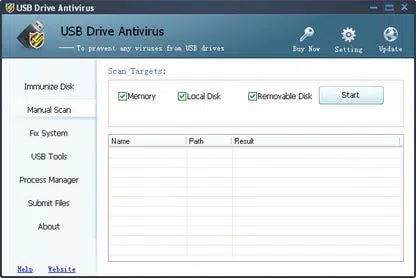
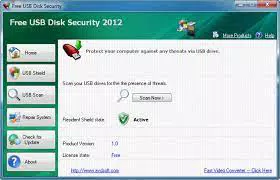
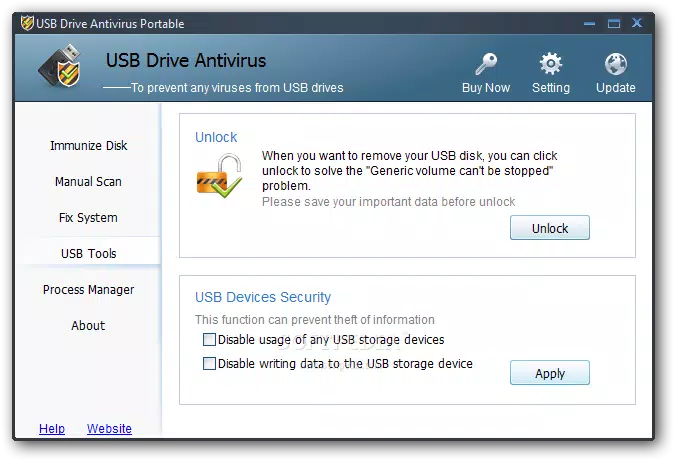
USB Drive Antivirus presents a user-friendly interface designed for accessibility across skill levels. The layout is clean and intuitive, with clearly labeled sections and straightforward navigation. Users can initiate scans, view scan results, and manage connected devices with minimal effort, suggesting a focus on usability over complexity. The visual style aligns with standard mobile security app conventions—minimalist, with clear icons and status indicators. This enhances readability and reduces cognitive load during use. Navigation flows logically from device detection to scan initiation and result review, supporting a seamless user experience. Although the developer did not list formal performance metrics, the app’s lightweight footprint of 24.1 MB suggests efficient resource management. This size is consistent with a tool that runs background scans without significantly affecting battery life or system responsiveness. Responsiveness is expected to be high, given the app’s focus on real-time USB monitoring. However, specific performance data across different device categories—such as budget, mid-range, or flagship Android models—was not disclosed. Stability appears to be a design priority, as the app avoids conflicts with other security tools. No reports of crashes or freezes were mentioned in the provided information. Nonetheless, users should be aware that actual performance may vary based on device hardware and Android version. The app’s ease of use makes it suitable for both novice and experienced users, particularly those who may not have deep technical knowledge of malware threats but still need reliable USB protection.Platform Compatibility & Technical Requirements
USB Drive Antivirus is available exclusively on the Android platform, targeting users of Android-based mobile devices. The app’s current version is 1.0.0, released on March 20, 2024. It has a file size of 24.1 MB, which is relatively small and suitable for devices with limited storage. The developer did not specify minimum OS requirements, nor did they list supported Android versions or device compatibility details. As such, it is unclear whether the app functions on older Android releases or requires newer system features such as USB OTG support. Additionally, no information was provided about hardware requirements or the need for specific permissions related to USB access, file system interaction, or background execution. Users should exercise caution and review permissions carefully during installation, especially when granting access to storage and device management. Compatibility with various USB drive types—such as pen drives, SD cards, and external hard drives—was not explicitly confirmed. However, the app’s purpose implies support for standard USB mass storage devices when connected via OTG cables or compatible ports.Pros and Cons
- Specialized focus on USB-specific malware threats
- Automatic scanning upon USB insertion
- Designed to work alongside other antivirus software
- Lightweight and reportedly non-intrusive
- Free to download and use
- Developer did not disclose OS compatibility requirements
- No details on supported USB device types or hardware specifications
- Performance metrics and real-world testing data were not provided
- Information on permissions and data handling is limited
- App size and version suggest early-stage development


